Thank you for becoming a partner of Shortlister
The following will provide guidelines for completing your enrollment
Complete your Profile to 100% by providing as much of the information as possible. Please note that updates made to your Profile are not visible on myshortlister.com until the following day.
If your account includes a Matching Survey, continue to the next section. If your account does not include a Matching Survey, contact us when your Profile is 100% complete for next steps!
If your account includes a Matching Survey, it should be fully complete in order to be active in our system (some exceptions may apply). Your Matching Survey data will factor into Shortlister’s algorithm to connect buyers with vendors who can deliver their need.
In order for a section to save, be sure to click
at the top right of the page. If you do not click
OR if you click
, the answers you’ve provided for this section will NOT be saved.
When making updates to your Matching Survey, be sure to click all the way through to the end of the survey.
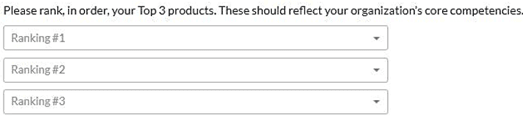
Within the first section of your Matching Survey, you will be asked which primary products you offer. Select a maximum of three products that are core to your business and that you are widely known for. Think of this as the key “entry products” that an employer or consultant may be searching to find you. The next page will allow you the opportunity to identify additionally offered products from the list.
After selecting the Primary Product they are searching for, the employer or consultant will choose the additional products they’d like bundled with that Primary Product. As a reminder, if a product is bundled with your other offerings, is not offered standalone, is a component offered via a third-party or is something that you’d say “we can offer that, but it’s not our core competency”, it is likely a Secondary Product.
Indicate any additional products you have available to bundle with your Primary Product(s).
Select
if you don’t have any products to add.

The product details section will allow you to provide detail about the delivery of your product(s).
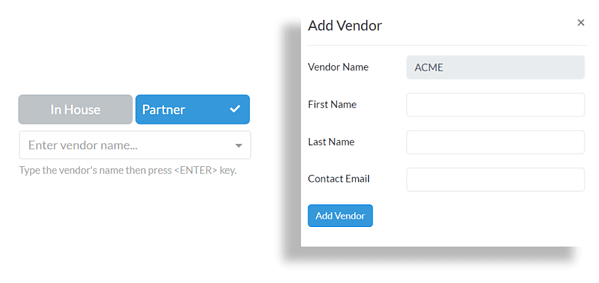
How a product is delivered: Indicate for each program whether or not you offer it in-house or through a partner and if you offer it on a standalone (ie “ala carte”) basis.
Listing Partnerships: If you offer a program through a partner, the system will ask you to select the name of your partner or add it if it isn’t there. if your partner is not on the Shortlister platform, you will be asked to provide their contact information. If you offer the product through a partner, it should not be be indicated as “Standalone.” This is to prevent you from coming up against your partner in an opportunity.
Vendors with specific product offerings will be asked to provide more details about those offerings within these sections. Product Questions will not be displayed for all vendors.
Product Questions and Features: Please indicate whether or not you offer any of the items listed. If something is on your roadmap, but not currently available, include the date it is expected to go live by selecting the date on the calendar pop-up.
The Summary of Clients section asks for more detailed information about the costs and group sizes associated with the products selected. Complete the data set for each product listed.
Average PEPY Cost: Select the most accurate price representation for your average cost per employee per year (low, average, or premium). If you see specific dollar amount ranges in this field, select the appropriate option based on your price.
Group Size Limitations: You will only appear in searches for groups within this specified range. For no minimum, leave 0 in the field. For unlimited group sizes, leave No Maximum in the field.
Annual Covered Lives: Enter the number of annual covered lives for your product(s).
Client Size Breakdown: Enter the number of clients in each group size band for your product(s). Enter the number of clients whose group size is 1-250, the number of clients whose group size is 251-1,000, and so on. Total Groups will automatically update accordingly.
In the Demographics & Goals section, you will include information on your capabilities and client demographics.
Primary reasons clients choose you: Use the drop down to select the top three reasons clients choose to work with your organization.
Client Goals: Use the drop down to select the 3 most common goals of the clients who choose to work with your organization.
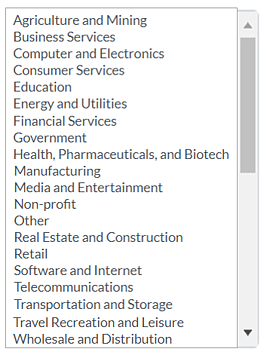
Who your clients are: Select the top 3 industries verticals which represent over 10% of your book of business.
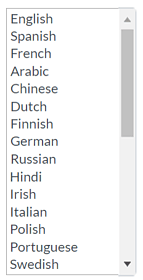
Language: Select all language options available for your product(s).
Locations: Select all states in which you can deliver your product(s). Include Canada and/or International, if applicable.
Technical capabilities of clients: Select the most appropriate level of the technical aptitude and capabilities of your average client.
To change the selection, click on the blue circle and drag it to level of technical aptitude/capability you wish to indicate.
Service level: Select the most appropriate level of service you provide to your average client.
To change the selection, click on the blue circle and drag it to level of service you wish to indicate.
Used by most of the top employee benefits consultants in the US, Shortlister is where you can find, research and select HR and benefits vendors for your clients.
Shortlister helps you reach your ideal prospects. Claim your free account to control your message and receive employer, consultant and health plan leads.