Go out to market in a fraction of the time with the Vendor Selection tab!
With the Vendor Selection tab you can...
1. Get your “shortlist” of appropriate
vendor options in minutes
2.Issue an RFP in record time
To get started, simply click “Start New Search.”
This will open up a window where you can input some information about your company and what you’re looking for in a vendor.
You’ll answer:
What type of product(s) you’re looking to find (e.g. payroll, EAP, financial wellness, HRIS, and many more)
What Features are important to your search (e.g. global capabilities or a native iOS app)
Top traits you’re looking for in a vendor
And more…
Don’t worry if you’re not sure about all of the answers; you can come back and edit your search at any time. Once complete, you’ll be brought to your shortlist of suggested vendor options!
Explore your
options and discover
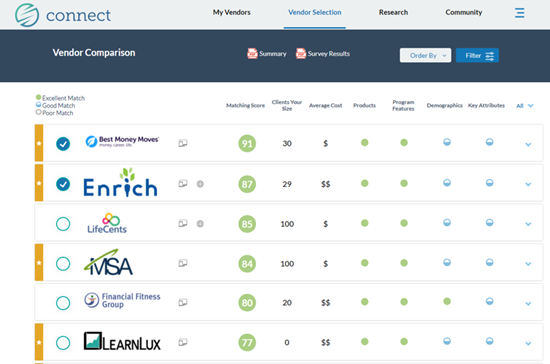
How well each vendor matches what you’re looking for, from products offered to industries represented.
If a vendor option is missing a specific feature or product that is important to you.
Collateral, ratings/reviews, product brochures, and more to further assist in your research.
Be sure to click “Summary” at the top of the page to download a comparison of your options to share with other decision makers. Any vendors with the blue check mark next to their logo will be included in the summary.
Ready to move forward and request pricing and other information? Make sure there is a check mark next to the vendors you’re interested in, and then scroll to the bottom of the page and click “Notify Vendors & Continue.”
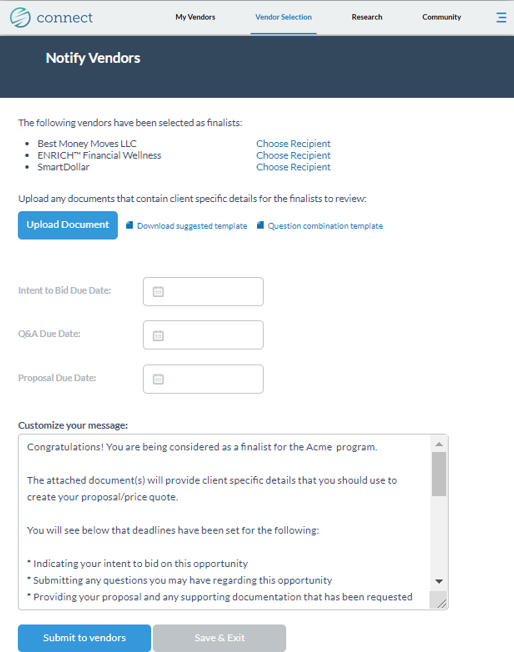
Outline your due dates and share any custom messaging or supporting documentation.
“Submit to vendors” when you’re ready!
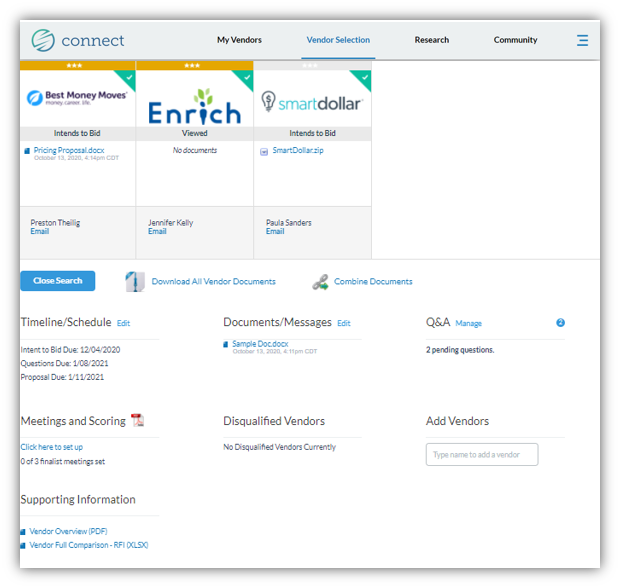
You now will have a dashboard to easily manage your project in real time.